Blog
How I Organise My Rekordbox Library for the Pioneer XDJ-RX3
Discover how I organise my Rekordbox library using playlists, BPM and key-matched mini sections, plus a bespoke silence track for clearer navigation on the Pioneer XDJ-RX3.
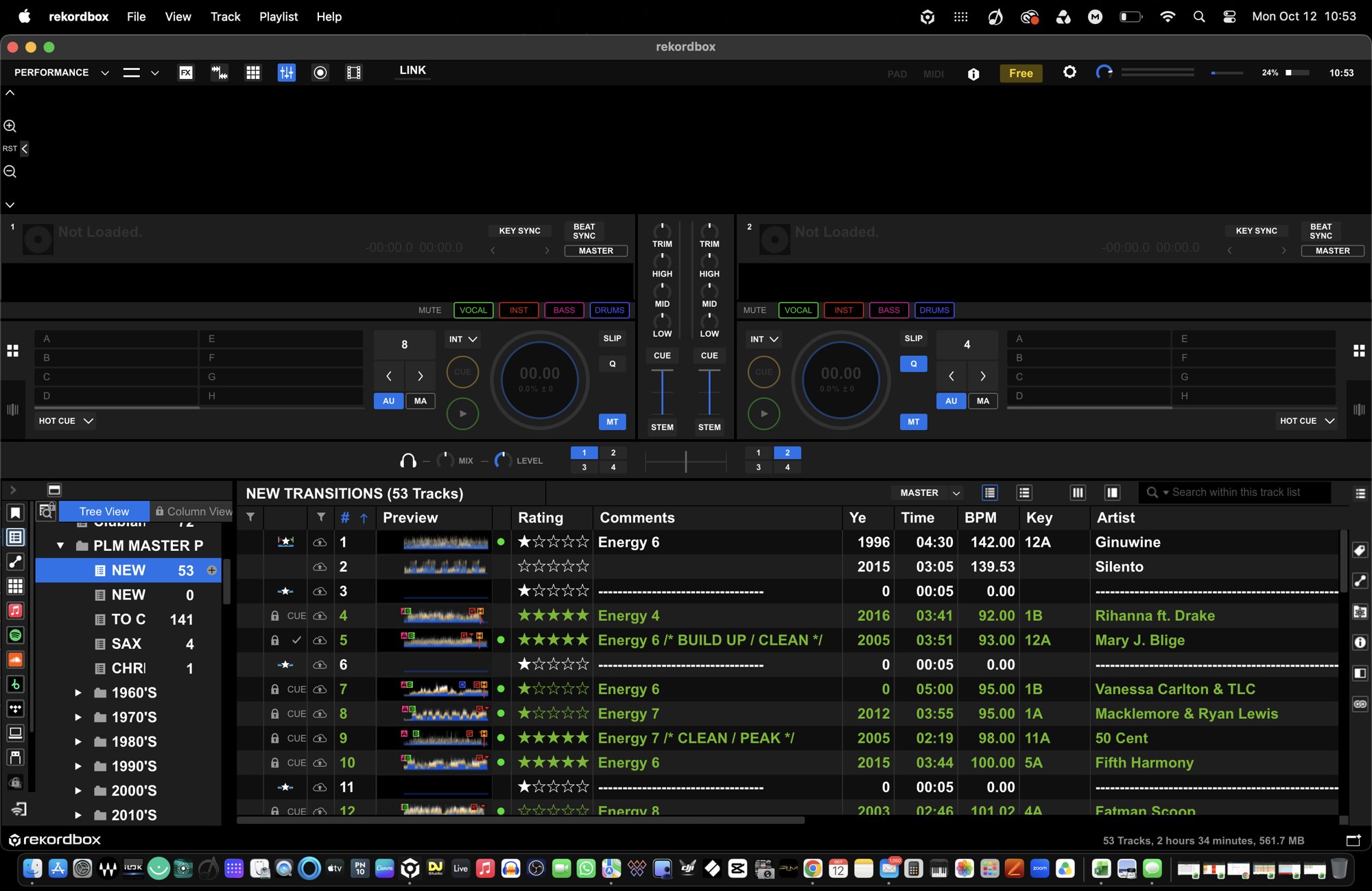
How I Organise My Rekordbox Library: A System Built for the Dancefloor A well-organised DJ library isn’t just about having the right music. It’s about knowing exactly where to find it, understanding how tracks work together, and keeping control of the room when it matters most. After years behind the decks, I’ve learned that preparation is just as important as performance. Having thousands of tracks available means very little if you can’t find the right one at the right moment. That’s why I take a structured approach to organising my Rekordbox library, using playlists, carefully grouped tracks, and a few bespoke touches to make my workflow as efficient as possible when performing on my Pioneer XDJ-RX3. 1. Playlists: Building the foundations My Rekordbox library starts with playlists. These provide the foundation for organising music into manageable collections, making it easier to navigate different events, audiences and musical styles. Rather than relying on one enormous playlist, I prefer a more structured approach. Having dedicated playlists means I can quickly narrow down my choices, whether I’m playing a wedding, birthday, corporate event or something that calls for a completely different musical direction. The aim isn’t to restrict what I play. It’s to make sure I can access the right music without wasting time scrolling through hundreds of unrelated tracks. Good organisation gives you options, and options give you confidence. 2. Mini sections: Grouping tracks that work together One of the most useful parts of my system is creating smaller sections within my playlists. I organise complementary tracks together, considering three important elements: * Vibe: Tracks that share a similar mood, energy or musical character. * BPM: Tracks with compatible tempos, making transitions and changes in energy easier to manage. * Key: Tracks that work harmonically together, helping me create smoother mixes and more musical transitions. This doesn’t mean every track has to match perfectly in all three areas. Sometimes a change in tempo or key is exactly what a set needs. However, grouping tracks that naturally complement one another gives me a useful starting point when selecting the next record. For example, a run of feel-good classics might be grouped together, followed by a section of upbeat floor-fillers or tracks that build towards a bigger moment on the dancefloor. These mini sections act as musical signposts. I can move between different moods and energy levels while keeping the overall flow of the set in mind. Ultimately, I’m not trying to build a playlist that dictates every song I play. I’m building a library that helps me make better decisions in real time. 3. My bespoke silence track: A simple visual trick One of the little touches in my Rekordbox setup is a bespoke silence track. I’ve created a silent audio file and added an ID tag so that it appears in my library with a clear, deliberate label. I use it as a visual divider between groups of tracks. When viewing a playlist on the Pioneer XDJ-RX3, this creates a much clearer separation between sections. Instead of looking at one continuous list of track titles, I can see where one group ends and another begins. It’s a simple idea, but it’s surprisingly effective. The silence track isn’t there to be played. It’s there to help me organise what I’m seeing on screen. Think of it as a separator in a document: the content remains the same, but the layout becomes much easier to navigate. For a DJ working in a live environment, that extra visual clarity can make a real difference. When you’re managing requests, reading the room and preparing your next transition, anything that reduces unnecessary searching is worthwhile. A practical note: I keep the separator clearly labelled and make sure it’s not accidentally loaded or played during a performance. As it is an audio file, it still behaves like a track within the library. 4. Optimising everything for the Pioneer XDJ-RX3 A library that looks tidy on a computer isn’t necessarily easy to use when you’re standing behind the decks. My system is designed with the XDJ-RX3 in mind. The screen is my point of reference during a performance, so clear playlist structures, recognisable track titles and visual separation all help me navigate quickly. The idea is to spend less time searching and more time concentrating on the audience. When the dancefloor is moving, you don’t want to be scrolling endlessly through a playlist trying to remember where you put a particular track. You want to know where to look, understand the musical options available and make your next decision confidently. That is where preparation pays off. I also make sure my Rekordbox library is properly prepared and exported to my USB drives before a gig. A consistent system across my playlists and performance media helps reduce the chances of confusion when it’s time to play. 5. Why I don’t rely on BPM and key alone BPM and musical key are valuable tools, but they don’t tell the whole story. Two tracks might share the same tempo and compatible keys but have completely different energy levels. One might be perfect for building momentum, while the other could take the atmosphere in an entirely different direction. That’s why I combine technical information with musical judgement. I consider the mood of the track, its familiarity, the audience I’m playing to and the moment in the evening. My mini sections help me identify possible combinations, but the final decision always comes down to reading the room. Software can help organise a collection of music. It can’t replace experience, timing or understanding an audience. 6. A library that supports the DJ, not the other way around Every DJ develops their own way of working. Some prefer a small collection of carefully selected playlists, while others build extensive tagging systems and smart playlists. My approach combines structured playlists, complementary mini sections and the bespoke silence-track separators that make the library easier to read on the XDJ-RX3. None of these techniques is particularly complicated on its own. The value comes from bringing them together into a consistent workflow. The best system is the one you understand instinctively when you’re working under pressure. It should help you find music quickly, give you creative options and leave you free to focus on what really matters: delivering a great night. Final thoughts Organising your Rekordbox library is one of those behind-the-scenes jobs that can have a genuine impact on your performance. My advice is straightforward: take the time to organise your music properly, group tracks that complement each other, make good use of BPM and key information, and don’t be afraid to develop small custom solutions that suit the way you work. My bespoke silence track is a perfect example. It doesn’t change the music, improve a mix or make me a better DJ on its own. It simply makes my library easier to navigate, and that is precisely why I use it. Because when you’re behind the decks, the less time you spend looking for a track, the more time you can spend being a DJ. Preparation happens before the gig. Performance happens on the night. A good library helps bring the two together.
First documented in 1897, the mirrorball has illuminated dancefloors for more than 129 years. At PLM Entertainments & Events, we’re proud to bring this timeless classic into our modern PLM Signature wedding experiences.
After three years using the Pioneer DJ XDJ-RX3, we share our honest review of this professional all-in-one DJ system. From its touchscreen and rekordbox workflow to its limitations with standalone music streaming, discover why it remains a strong choice for mobile DJs, plus our pro tips for running
Discover the PLM Signature Rustic wedding DJ experience at voco St David’s Cardiff, featuring our bespoke booth, Ape Labs lighting, illuminated letters and rustic audio guestbook.